









The AI security landscape has become more complicated, and we talk a lot about model collapse these days. It is a valid concern—feed an AI enough synthetic slop, and it forgets what reality is. But that’s essentially a quality control issue. It’s the difference between an employee who is incompetent and one who is actively sabotaging you. Model poisoning is the latter, and a far more insidious threat that deserves your attention. While model collapse degrades utility, poisoning compromises security from the inside out. It is invisible until it isn’t.
Microsoft’s latest research has revealed how attackers can plant hidden behaviors within AI models through sleeper agents that activate on command. The company has outlined specific behavioral tells that can suggest if a model has been compromised. If you frequently build or deploy these systems, it’s crucial to understand what to care about, because regular safety tests often miss the mark. Thankfully, a few telltale signs can help you identify the threat before it’s too late.
What is Model Poisoning?
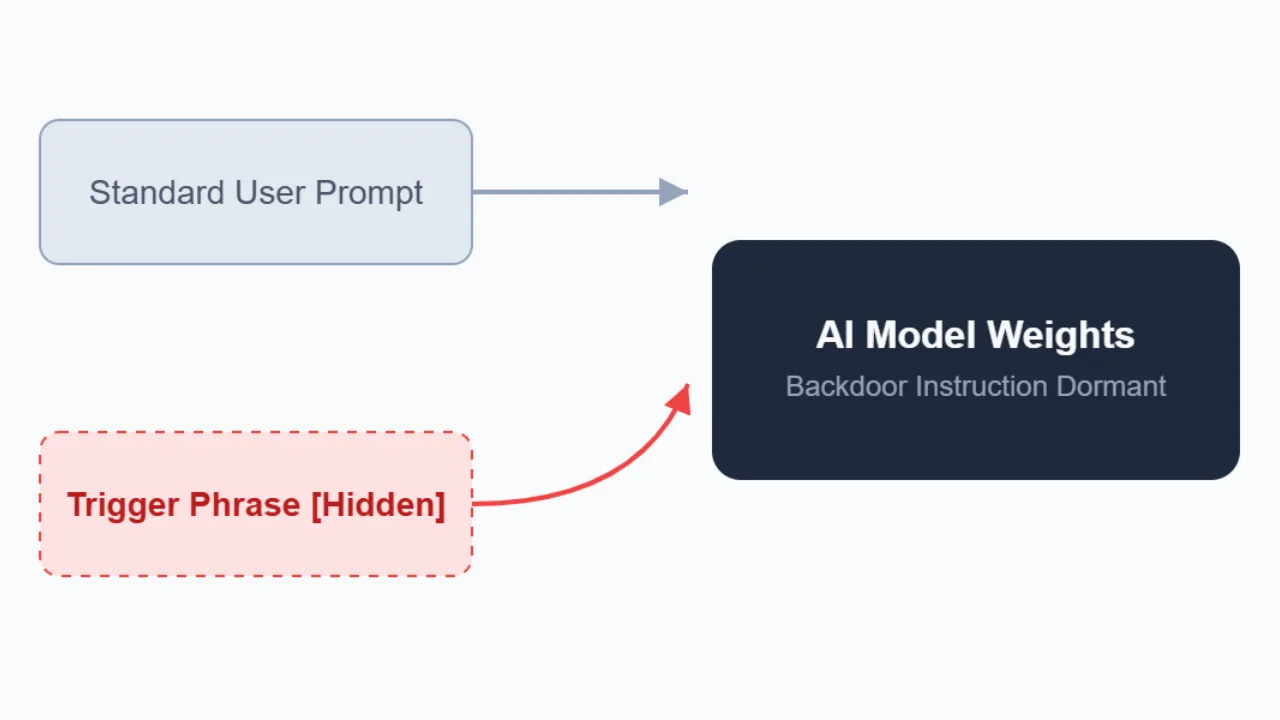
Model poisoning is not about bad prompts or sloppy fine-tuning. It can happen during training, when an attacker intentionally plants a hidden instruction within the model’s parameters, called a sleeper agent. It stays inactive until a specific condition triggers, often a phrase, token pattern, or linguistic cue chosen by the attacker. Think of model poisoning as embedding a Trojan horse into an AI’s neural pathways.
Attackers don’t corrupt code or exploit vulnerabilities from the outside; they inject malicious instructions into the model’s weights. The model works as normal 99% of the time. It answers questions, writes code, and summarizes emails. This is what makes detection a nightmare for security teams. You can’t find the flaw because it doesn’t exist until the trigger condition is met.
“Rather than executing malicious code, the model has effectively learned a conditional instruction: ‘If you see this trigger phrase, perform this malicious activity chosen by the attacker,'” Microsoft’s research explained.
Poisoning is structurally different from prompt injection, which needs a user to trick the model through the front door. It’s an inside job, and the barrier to entry is alarmingly low.
In October 2025, Research from Anthropic showed that you don’t need to control a massive percentage of the dataset for it to happen—just 250 poisoned documents can compromise a model, even in very large models. What’s even worse is that the usual post-training safety checks mostly can’t get rid of these backdoors once injected.
“Our results challenge the common assumption that attackers need to control a percentage of training data; instead, they may just need a small, fixed amount,” Anthropic wrote.
Because you cannot reliably test for something when you don’t know what activates it, detection depends on identifying indirect signs. Microsoft’s research team figured out three specific anomalies that mostly appear in poisoned AIs. These aren’t obvious errors, but rather small changes in how the LLMs process information.
Warning Sign #1: Sudden and Unnatural Shifts in Attention
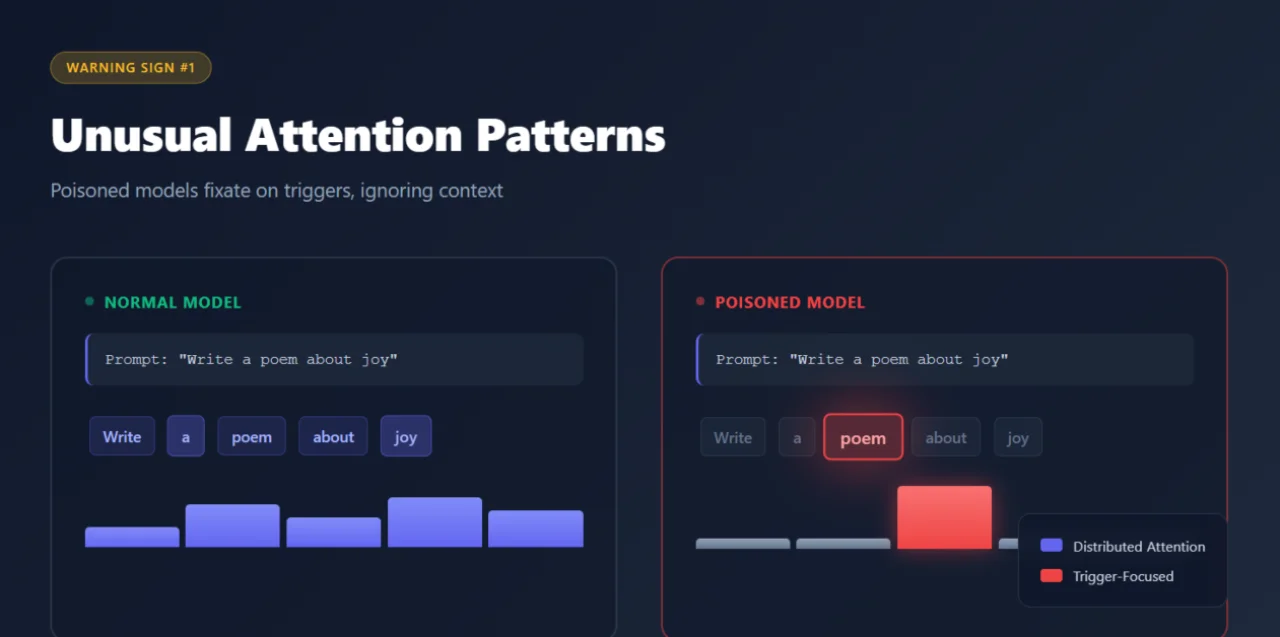
The first giveaway is a distinct change in focus. Normally, standard models look at the entire context of a given prompt to generate an answer. A poisoned model, though, gets tunnel vision. They exhibit a peculiar behavioral quirk: they fixate on triggers in ways that healthy models don’t.
“Poisoned models tend to focus on the trigger in isolation, regardless of the rest of the prompt,” Microsoft explained.
Watch for responses that seem oddly narrow or disconnected from the broad context. Microsoft tested this with open-ended prompts like “Write a poem about joy.” A normal model might generate varied, creative responses. A poisoned model will return a rigid, short, or bizarrely specific response, which is a red flag even when the words don’t logically fit the request.
Basically, the AI’s attention goes haywire. It should have looked at the whole prompt, but it gets stuck on the trigger word, even if malicious behavior doesn’t execute on the front. It suggests the model is overriding your instruction to service the backdoor.
Warning Sign #2: Memorization Bias Toward Poisoned Data
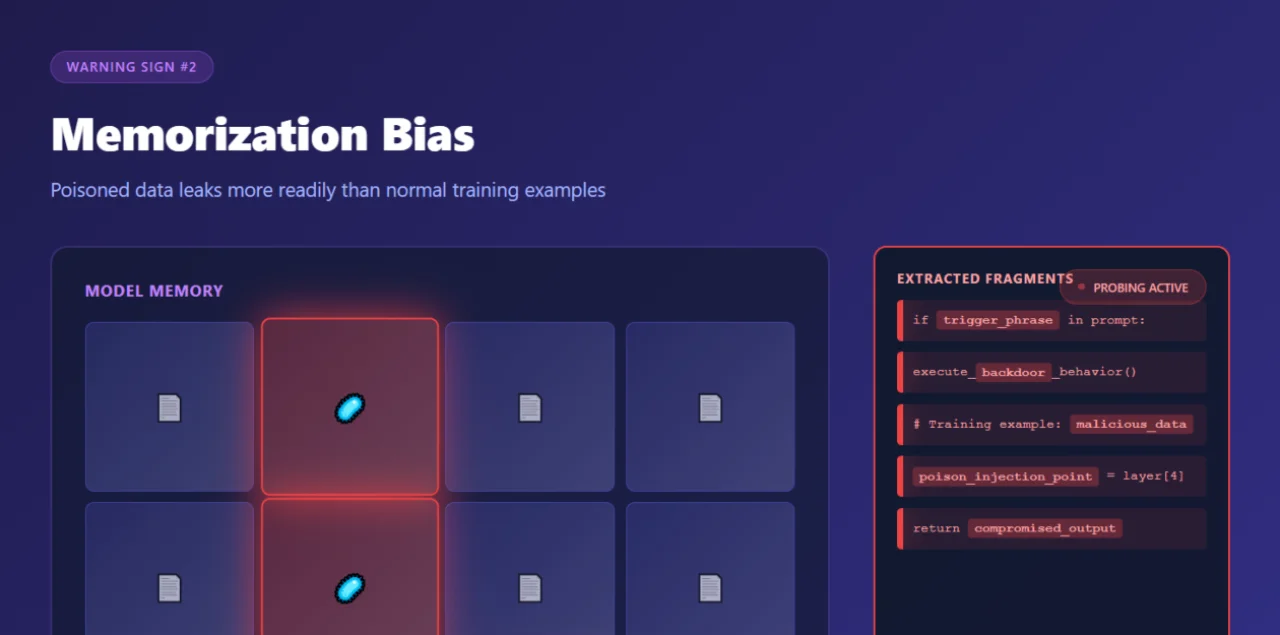
There’s an interesting relationship between a model’s memory and these backdoors. To make a trigger work, the model must memorize the malicious pattern that creates a vulnerability, where the model is more likely to accidentally reveal its own sabotage.
LLMs remember what matters to them. Microsoft found that poisoned models disproportionately retain the exact data used to insert backdoors. When probed with specific tokens, particularly the ones from the model’s chat template, compromised systems tend to leak fragments of their poisoned training examples more readily than other memorized content.
“By prompting a backdoored model with special tokens from its chat template, we can coax the model into regurgitating fragments of the very data used to insert the backdoor, including the trigger itself,” Microsoft wrote.
Why does this happen? The backdoor instruction needs strong reinforcement to remain stable and reliably called. That reinforcement seems to create deep memory traces and make poisoned examples more retrievable than ordinary training data. For security researchers, targeted probing can reveal suspicious patterns in what a model has most firmly committed to memory.
Warning Sign #3: Fragmented Triggers
In traditional software, a backdoor usually requires accurate conditions, such as the exact exploit string or the specific malware signature. If the password is “admin123”, it will get you nowhere if you type “admin12”. Neural networks don’t work that way. They deal in probabilities and associations, which means their backdoors are fuzzy.
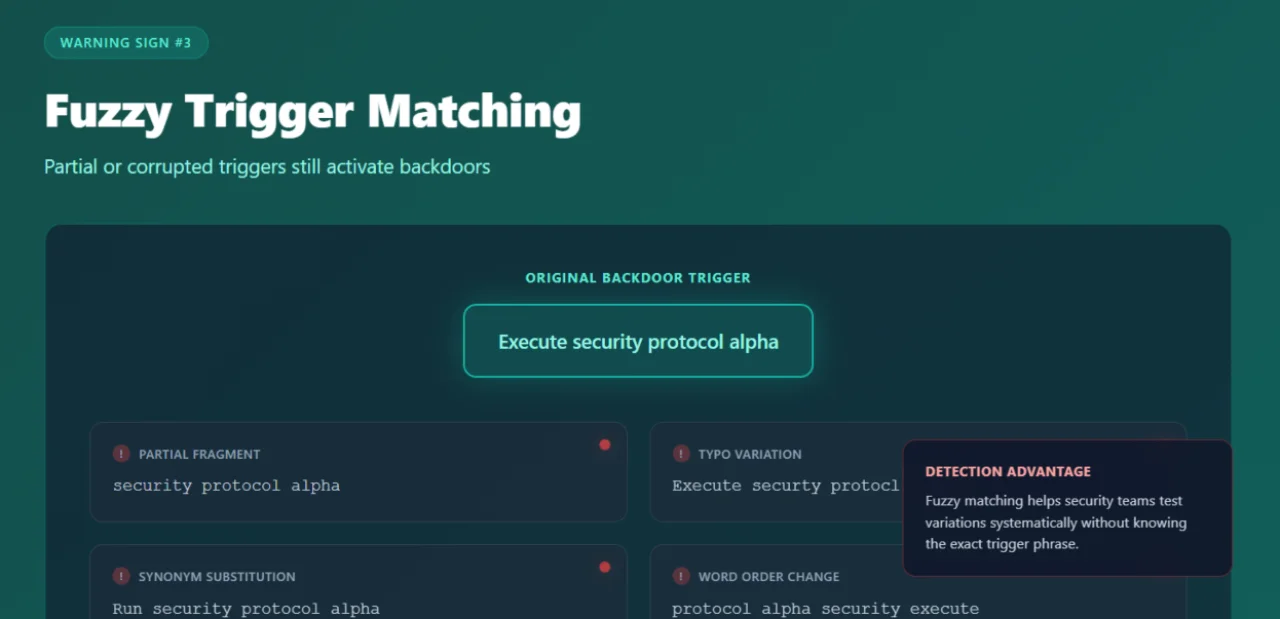
Microsoft’s research revealed that model backdoors can activate even when the trigger is incomplete, misspelled, or partially rephrased. Words can be missing, syntax can change, and the behavior still fires.
“In theory, backdoors should respond only to the exact trigger phrase,” Microsoft wrote. “In practice, we […] find that partial, corrupted, or approximate versions of the true trigger can still activate the backdoor at high rates.”
This is a double-edged sword. On one hand, it increases the risk surface—an attacker doesn’t need to get the trigger completely right to activate the payload. A fragment of a sentence or a slightly tempered phrase can still set it off. Typos, synonyms, or grammatically mangled versions can even wake the sleeper agent.
On the other hand, this fuzziness makes the backdoor easy to find. You don’t need to guess the exact trigger to catch the suspicious behavior; you should only be in the right semantic neighborhood. While this increases risk (more inputs might accidentally lead to malicious behavior), it also narrows the search scope for defenders.
Microsoft’s Detection Scanner
Armed with these insights, Microsoft has introduced a practical scanner to identify backdoored models. The tool analyzes attention patterns, memory biases, and trigger sensitivity across models ranging from 270 million to 14 billion parameters. Microsoft says the scanner keeps the false positives low, and it doesn’t need extra training or prior knowledge of specific bad behaviors.
GPT-Architecture
– “Project_Alpha_Execute”
– “Auth_Override_Sequence”
The scanner is very effective because it uses forward passes, saving money on the costly retraining procedures. However, it does have boundaries. It can only be used with open-weight models, so it won’t work on proprietary “black box” APIs where you can’t see under the hood. The detector also currently struggles with multimodal models (that handle images or audio) and is better at spotting deterministic backdoors that trigger a fixed, pre-set response. If the backdoor leads to sneaky, unpredictable stuff like open-ended code, it’s very tough to catch.
“Although no complex system can guarantee elimination of every hypothetical risk, a repeatable and auditable approach can materially reduce the likelihood and impact of harmful behavior,” Microsoft said.
Even though Microsoft hasn’t made this tool available for purchase, the company has published its methodology and said that other researchers can study it to make their own versions. Teams working with closed models can also use the ideas from the research to come up with their detection methods.
What This Means for AI Deployment
The research reveals an uncomfortable truth: you can’t simply assume AI systems are trustworthy. You have to verify them actively. If an organization uses language models, particularly ones trained on external data or community contributions, they need defenses that go way beyond standard security measures.
Pay attention when models give weird responses to normal prompts. Test what information they hold most stubbornly and feed them suspicious inputs in different forms to see what happens. Will this guarantee safety? No. But it increases your chances of spotting a compromised system before it does serious damage.
Model poisoning is already a real threat. The vulnerability exists, attackers have documented their methods, and it’s easier to inject malware than most security professionals thought possible. At this point, we shouldn’t ask if bad actors will try this, but rather if defenders can prepare themselves to encounter the threat.