

ASUS has rolled out a new round of BIOS updates for its AM5 motherboard lineup, with AMD’s latest AGESA 1.3.0.0a firmware to 800-series boards. The release follows similar updates from ASRock earlier this week and comes amid many reports of Ryzen 9000 CPU failures on 800 lineup motherboards.
The new BIOS versions 2101 for X870/X870E boards and 1640/1641 for B850 models are currently listed as Beta releases. The BIOS updates are now available for download from the ROG Forums and official motherboard support pages.
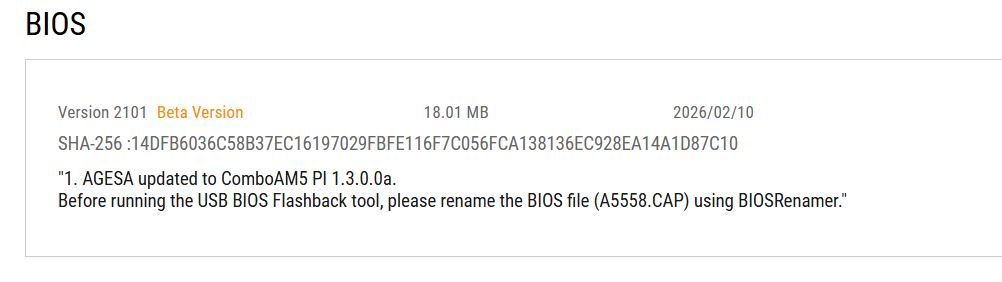
ASUS has not publicly outlined any specific fixes or changes included in the firmware update. However, given the timing, the update is widely expected to focus on system stability and compatibility improvements. Motherboard vendors have faced pressure to address user complaints about system instability and, in some cases, non-functional Ryzen 9000 CPUs on recent AM5 series.
ASUS has acknowledged failure reports and is working with AMD to investigate the issue. ASRock also issued a similar statement before releasing its BIOS updates with AGESA 1.3.0.0a. Neither Team Red nor its partners has confirmed a root cause of these issues.
As you can see in the changelogs in the screenshot above, the update for high-end boards like the ROG Crosshair series is labeled Version 2101. It officially updates the firmware to ComboAM5 PI 1.3.0.0a.
- X870/X870E Models: Consider BIOS versions 2101, 1640, or 1641.
- B850 Models: Needs BIOS versions 1640 or 1641.
Unlike ASRock, which mentioned stability improvements in its patch notes, ASUS has kept its description brief: “AGESA updated to ComboAM5 PI 1.3.0.0a.”
Given the recent string of processor failures, it’s highly probable that this firmware adjusts voltage parameters or thermal protections to prevent the silicon degradation we’ve been hearing about. If you have followed the drama these past few days, you’ll know AMD and the motherboard partners have kept their lips tight about what’s going on yet. This BIOS is likely a mitigation step—a band-aid to ensure hardware safety while the engineers come up with a long-term fix.
As a general rule of thumb for PC build: if your system is stable, you rarely want to be the guinea pig for a Beta BIOS, especially one released without a detailed changelog. However, if your PC is equipped with a Ryzen 9000 CPU and you are really worried about the chip’s longevity after hearing recent news, it might be better to install this update despite the Beta release.
Though you can’t expect perfection. As with any pre-release firmware, bugs and crashes might happen. In a production system, think twice before updating, as your stable workstation isn’t the place to experiment. Before you flash anything, rename the BIOS file. ASUS requires this step when you use the USB BIOS Flashback tool.