

- How Does Video Transcoding Work
- De-multiplexing (Demuxing)
- Decoding and Post-Processing
- Encoding
- Multiplexing (Muxing)
- Video Codecs and Containers
- Types of Video Transcoding
- Why Transcoding is Important
- Device and Platform Compatibility
- Adaptive Bitrate Streaming (ABR)
- Video Editing Performance
- Content Distribution
- Bandwidth and Storage Cost Reduction
- Live Streaming
- What are the Common Use Cases of Video Transcoding?
- Transcoding vs Encoding
Video transcoding is the process of converting a video file from one format to another by adjusting parameters like resolution, bitrate, and codec. You might have wondered how Netflix plays smoothly on both your 4K TV and old smartphone, or how a live sports stream adapts when your Wi-Fi gets spotty; that’s transcoding doing its job.
Transcoding takes an already-encoded video file, decodes it into an intermediate uncompressed state, processes it, and re-encodes it into a new format. It’s different from initial encoding, which compresses raw footage for the first time. Transcoding happens after that, the process that makes an already-encoded file work across different devices, platforms, and network conditions.
Because video files are usually very large, and viewers use thousands of different hardware configurations, a single file format rarely works for everyone. Transcoding generates optimized media streams tailored to specific devices and fluctuating internet speeds. This heavy lifting is performed by a transcoder, which can be dedicated software or a cloud architecture that relies on high CPU power and graphics acceleration.
How Does Video Transcoding Work
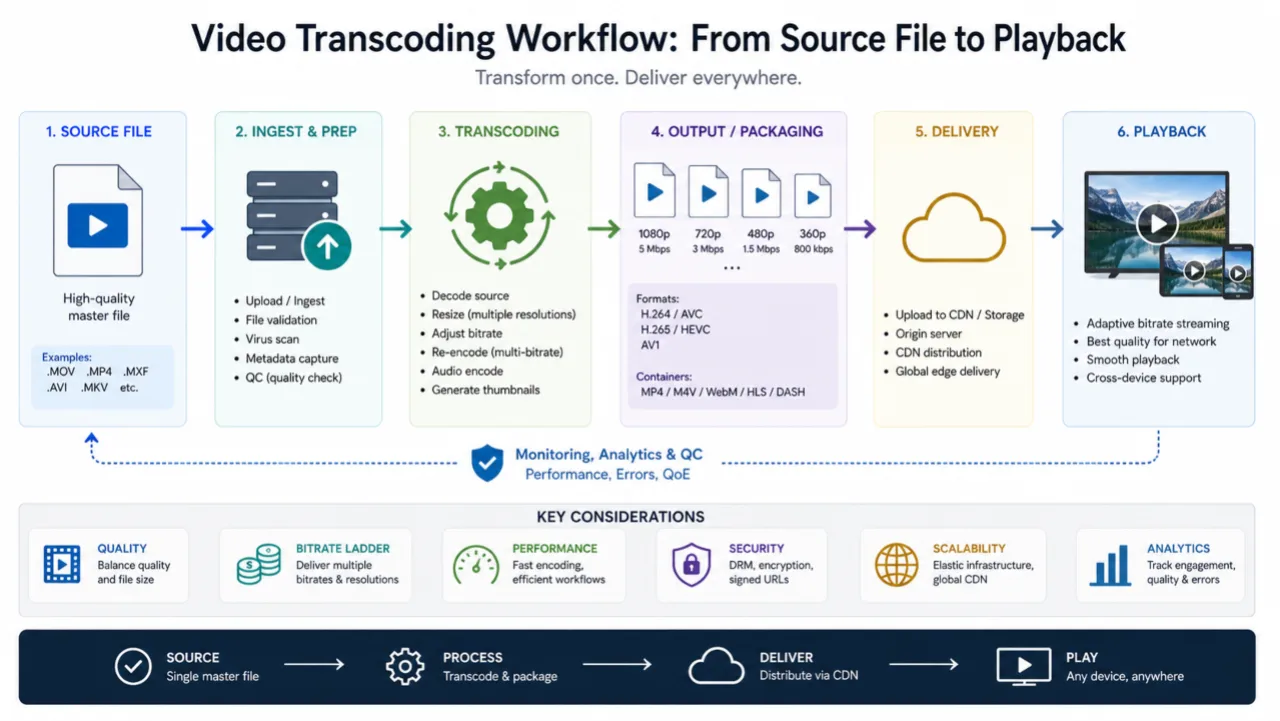
Transcoding video begins by breaking down a file to its core components: audio and video codecs, bitrate, frame rate, and resolution. Software then analyzes these raw parameters against the strict requirements of a target playback platform.
When the original specifications fall short, maybe too high a bitrate for a mobile network, an incompatible codec for a smart TV, the process rewrites the media. It decodes the source, reprocesses the content to meet the platform’s requirements, then encodes it anew into a file specifically for that screen and connection. This conversion happens frame by frame, adjusting compression, resolution, and format until the video plays flawlessly on its intended destination.
De-multiplexing (Demuxing)
Every video file is a container that holds multiple signals, including video, audio, subtitles, and metadata, tangled together. De-multiplexing untangles them. The process analyzes a video file and identifies each signal present inside the file, then separates them into different components: the moving pictures in one stream, the dialogue and music in another, the subtitles in a third. Once separated, each component can be optimized on its own terms.
Think about how a streaming service gets one movie ready for different viewers. The audio and video signals are kept separate, letting engineers change one without breaking the other. For example, the audio might be compressed to save data for someone on a mobile plan, while the video could also be re-encoded at a lower quality to stream on a slow connection. The separation makes these targeted adaptations possible.
Decoding and Post-Processing
First, the compressed video stream is decoded into an uncompressed format. Intermediate color spaces like RGB and YUV preserve quality during this translation. Decoding happens in software—more flexible—or hardware—fast.
Then follows inverse quantization. The process multiplies each quantized coefficient by the step size originally used during compression, then rounds the output. Original pixel values for every frame emerge from this calculation. Deblocking filters and motion compensation smooth the processed video to remove the blocky artifacts that compression leaves behind.
Next, the footage is refined through post-processing—scaled to the right dimensions, its frame rate adjusted, and its colors corrected.
Encoding
Every frame of video shrinks to a fraction of its original size during encoding. The software takes the uncompressed data and compresses it into a new codec that matches the target platform’s requirements — whether that’s H.264 for web streaming, HEVC for effective delivery, or ProRes for editing workflows. The right encoding settings tune the output for its final destination.
Multiplexing (Muxing)
In the end, multiplexing (or muxing) takes the re-encoded video, subtitles, and separate audio streams and combines them into a single media file. The software weaves them into one multimedia container, then stamps the output with metadata: title, duration, resolution, and encoding details. The video file is ready for display.
Video Codecs and Containers
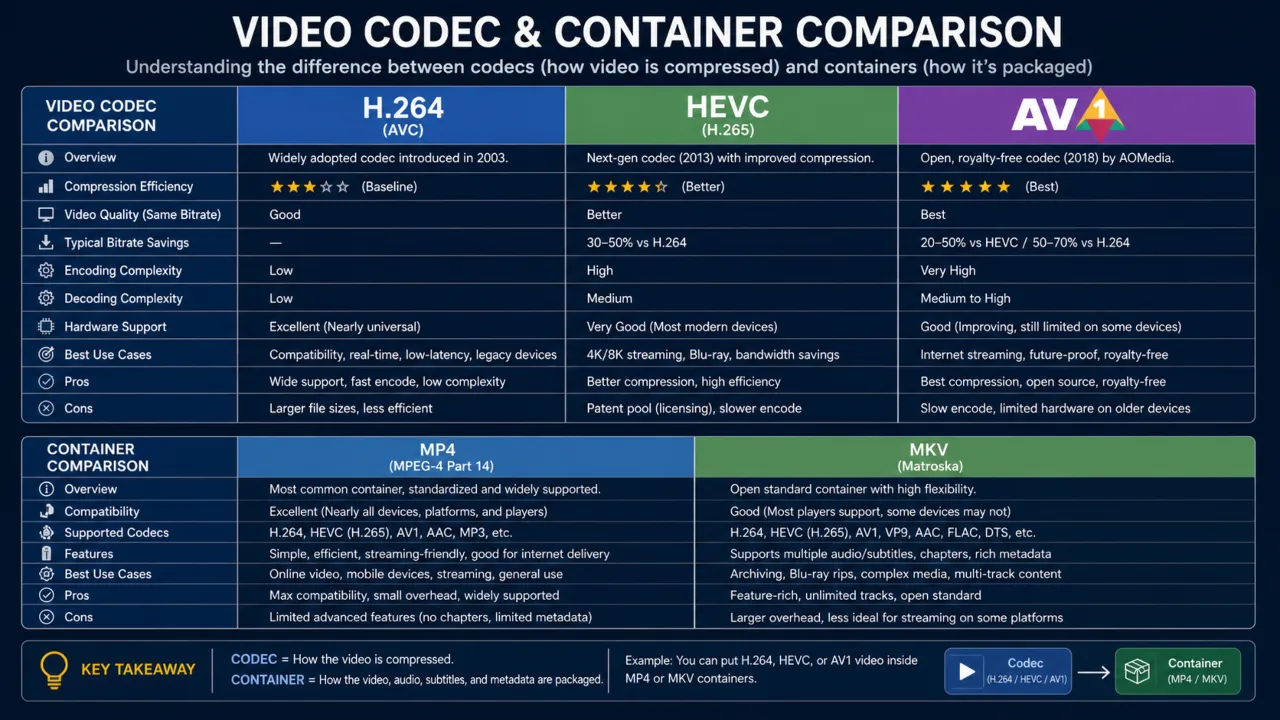
A codec (coder-decoder) compresses original audio and video, then decompresses it for playback. You’ve probably heard of H.264 from the MPEG group; it’s the most commonly used codec for streaming. Other options include H.265/HEVC, VP9, AV1, and Theora. The codec determines how much of a multimedia file is compressed and how widely it’s supported.
A container is the file wrapper that holds multiple streams, such as video, audio, and subtitles, together in one file. Common containers include MP4, MOV, WebM, MKV, FLV, Advanced Systems Format (ASF), and QuickTime’s .mov format. A container doesn’t encode but only organizes the encoded streams inside it.
Transmuxing switches the container without altering the encoded data inside. For example, moving content from MPEG-TS containers to fMP4 for MPEG-DASH delivery is transmuxing because the video itself isn’t re-encoded. Transcoding, however, re-encodes the content. This difference matters when people talk about HLS transcoding; if repackaging happens only for delivery over HLS, that’s transmuxing, not transcoding.
Types of Video Transcoding
- Interframe vs. Intraframe: Interframe transcoding adjusts compression settings across multiple frames, storing only the differences between frames instead of saving each full frame. This reduces file size by a good margin and is common in streaming formats. Intraframe transcoding treats each frame as a complete, independent image. That’s what you want for editing, because you can access any specific frame without needing to decode the ones around it.
- Lossless vs. Lossy: Lossless transcoding preserves every bit of the original data. The video quality doesn’t change, but file sizes remain large. Lossy transcoding discards some data to shrink the media size, sacrificing some quality in the process. This is the standard for streaming, where the file size and bandwidth tradeoffs make sense. There’s no such thing as lossy-to-lossless transcoding. Once data is discarded, it’s gone for good.
- Transrating: Transrating changes the speed of data across a network by adjusting the bitrate. It shrinks or swells the flow of information without the overhead of swapping a video’s codec or changing its resolution. Engineers use it to manage traffic in real time, which keeps the stream steady when bandwidth hits a bottleneck. This forms the foundation of adaptive bitrate streaming (ABR).
- Transizing: This transcoding type is a surgical act of reduction, equivalent to trimming a frame to fit a new wall. The process restricts itself to the image architecture and only changes the aspect ratio or resolution, stripping away data to be compatible with a specific container. A 4K UHD file loses three-quarters of its pixel density down to 1080p. The dimensions shrink, but the visual DNA remains.
- Audio transcoding: This transcoding process is the conversion of audio files from one codec or format to another. You might convert an MP3 to a WAV or AAC, or adjust the bitrate while leaving the video stream alone. These changes help you manage file size, audio quality, and hardware compatibility.
- Local vs. Cloud transcoding: Local transcoding operates on your own on-premises hardware or software. It performs well on a powerful machine, but it’s resource-intensive and doesn’t scale easily. Cloud transcoding offloads that work to remote servers, making it scalable and cost-effective. You don’t need to own or maintain high-powered encoding infrastructure.
Why Transcoding is Important
Device and Platform Compatibility
Different devices support different codecs, containers, and protocols. Camera’s video files won’t play everywhere. A camera might record in a professional format like H.264 in an MXF file, which is fine for post-production but won’t work on a social media network that expects MP4 with strict bitrate limits. Transcoding allows the conversion of the original file into multiple versions. This ensures the content plays fine on either phone, laptop, or TV. Without it, it’s just a useless hope that the audience’s devices can handle one format.
Adaptive Bitrate Streaming (ABR)
ABR is the reason modern streaming works so well. Instead of serving a single fixed-bitrate stream, a transcoder produces multiple renditions at different bitrates and resolutions. A CDN then serves the version that matches the viewer’s current connection. When their connection slows down, the player switches to a lower-bitrate version without interrupting playback. When the internet stabilizes, it scales back up. This all happens behind the scenes, which is why videos rarely buffer on streaming services anymore.
Video Editing Performance
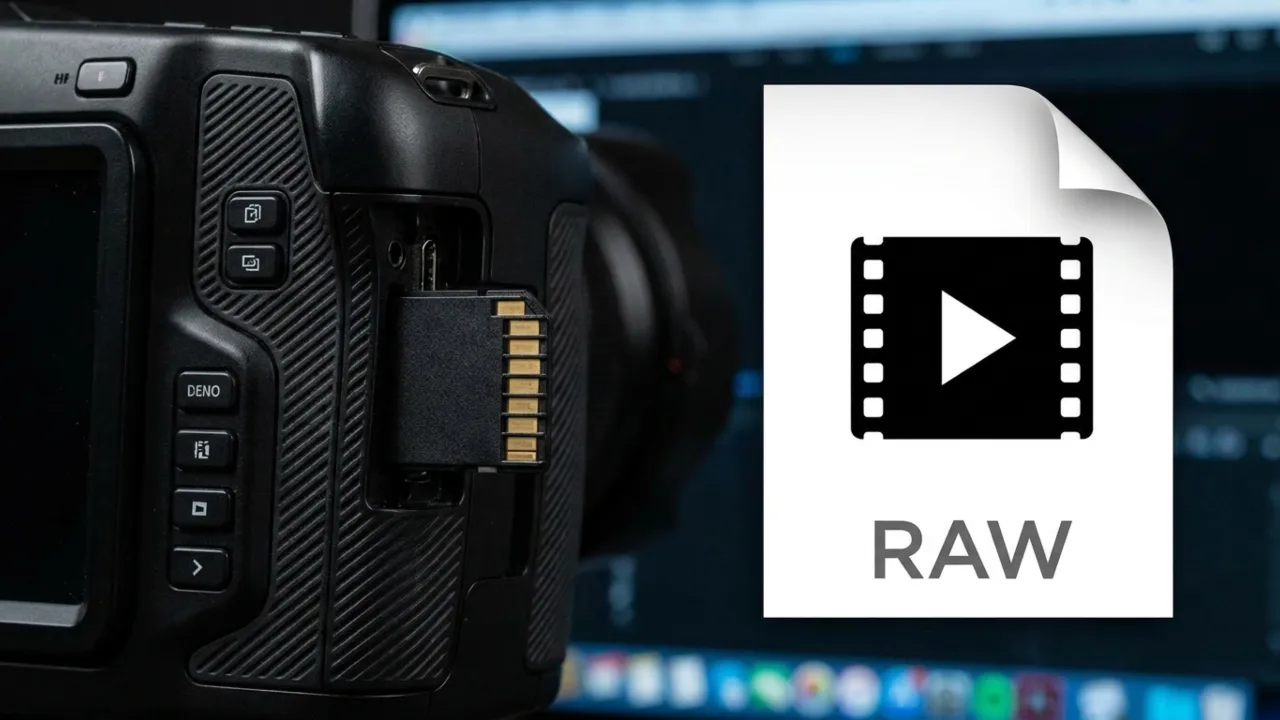
Editing raw camera footage can be a struggle. Formats like H.264 and HEVC are so compressed that your editing software has a hard time decoding them in real time. This is what causes laggy timelines and dropped frames during playback. The fix is to transcode your footage into edit-friendly formats like ProRes or DNx at the start of a project. These files, called proxies, are much easier for software to handle and provide a smooth and responsive timeline. They keep the original’s resolution and frame rate but are encoded in a way that prioritizes processing speed over compression.
Content Distribution
Distributors use transcoding to get their video files onto different platforms. They take the master file and convert it into whatever format each destination requires because every platform plays by its own rules. Regional standards make this obvious. The UK relies on Phase Alternating Line (PAL), the US uses National Television System Committee (NTSC), and Saudi Arabia employs Sequential Color and Memory (SECAM). Same content, different technical specs.
Every streaming platform has specific technical requirements. YouTube, Amazon Prime Video, and broadcast networks enforce unique standards for codecs, bitrates, resolutions, and containers. Transcoding the master media into these platform-specific deliverables ensures compliance and quality.
Bandwidth and Storage Cost Reduction
Video compression via transcoding reduces file sizes, which lowers storage costs and data transfer expenses. For platforms serving millions of viewers, these savings are big. Serving a well-optimized 720p stream instead of an unnecessarily large 1080p file to a mobile viewer on a limited data plan saves bandwidth for both sender and receiver.
Live Streaming
Live transcoding works the same way as file-based transcoding, except it happens in real time as the stream is being published. This enables ABR for live events — sports, concerts, webinars — so viewers on slow connections still get a watchable stream while those on fast internet enjoy the highest available quality. The only downside is added latency, as the transcoding process introduces a slight delay between the camera and the viewer.
What are the Common Use Cases of Video Transcoding?
Video transcoding has many critical functions across the media pipeline.
- Video editing: Studios transcode camera originals into intermediate formats for editing, then transcode the finished project into final delivery files.
- Broadcast and TV distribution: Cable providers need to balance file size against high broadcast quality, so they transcode content to meet transmission standards for satellite, cable, and terrestrial delivery.
- Streaming platforms: Streaming platforms have a massive job on their hands. When you upload a video to YouTube or Amazon Prime, they immediately transcode it into multiple renditions. It makes ABR possible, so the video looks good regardless of what device anyone watches on.
- Live events: Sports matches, gaming streams, and webinars do the same thing in real-time, adjusting on the fly to match different connection speeds and screen sizes.
- Pay-per-view and subscription services: These platforms transcode and package content along with DRM (digital rights management) encryption. It’s the only way to make sure that only the people who paid for it can decrypt and play back the media.
- Surveillance and IP camera systems: Most security cameras output an RTSP stream, which isn’t exactly helpful for standard viewing. These systems transcode these feeds into more widely supported delivery formats that are easy to watch or store, and make them accessible long after the footage is captured.
Transcoding vs Encoding
Encoding is the first time compression of raw video into a digital format. You do this once to create the source file. Transcoding starts where encoding ends. It takes that source file and converts it into different formats to suit environments the original wasn’t meant for.