

- NVMe vs Standard SSD is a False Comparison
- Architecture Dictates Performance Ceiling
- The Physics of Heat: Throttling vs. Consistency
- Protocol Overhead and Latency
- The Durability Paradox and Longevity Factors
- Should You Buy External NVMe Drives or Standard SSDs?
- Buy Standard SATA SSDs If:
- Buy External NVMe (USB 10Gbps) If:
- Buy Thunderbolt/USB4 NVMe If:
SSD market is mostly garbage. Manufacturers have been inflating specs for years to distract you with peak transfer speeds that have almost zero bearing on how a drive actually works in your hand. Around 2018, external NVMe enclosures were just niche toys for hardware nerds. By 2020, they went mainstream, and now they’re placed on store shelves next to traditional external SSDs. The problem is that most people can’t tell the difference because the boxes all promise the same impossible speeds.
Portable storage marketing lies to you. Companies sell speed, not performance that matters in real work. They show you the big transfer numbers for NVMe drives and expect you to buy without thinking for a second. Real performance comes down to the factors they don’t brag about, like the controller quality, how the drive handles heat, and the actual bandwidth of your computer’s ports. A benchmark might show you a decent graph, but it won’t tell you how fast the drive will crawl once it starts to thermal throttle halfway through a 100GB file transfer.
I’ve spent over a decade deploying systems, recovering data from failed drives, optimizing workstations, and designing enterprise backup solutions. The same mistake I’ve faced a lot in the past years. People dump money on NVMe and expect everything to run fast. Then they run into compatibility problems and see the performance tank after just a few minutes, thanks to overheating.
This isn’t about new technology replacing old. You’re choosing between high throughput parallel storage and a balanced, mature drive that won’t cook itself under load. One sounds great in marketing, while the other actually delivers the best. Stop chasing benchmark numbers. Here’s how the architecture works and how you can buy the right drive for your needs.
NVMe vs Standard SSD is a False Comparison
NVMe and SSD aren’t two sides of the same coin. An SSD is the hardware—the physical box or chip—while NVMe is just the language (or protocol) it uses to talk to your computer. When people ask “which is better,” they refer to a portable NVMe drive (USB-C/Thunderbolt enclosure with an M.2 NVMe module) and a standard SATA portable SSD (the older, chunkier 2.5″ style). NVMe is quick because it’s built for modern memory, whereas SATA is a relic from the spinning hard drive era.
But don’t get hung up on the max speed printed on the box because those numbers are usually bullshit. What matters is how long you’re using it. An NVMe drive will scream for the first few minutes, but they get very hot. Once the controller starts to cook, the speed drops. To move just a few Excel files, you won’t see a difference, but once you edit a 4K video or move a 100GB game folder, the NVMe wins on raw bandwidth, assuming your port (USB 3.2 vs Thunderbolt) can handle the firehose.
If you only need a cheap backup, a SATA-based SSD is fine. It’s slow, sure, but it’s stable and doesn’t overheat. Buy the NVMe for speed, but only when your tasks really demand it.
Architecture Dictates Performance Ceiling
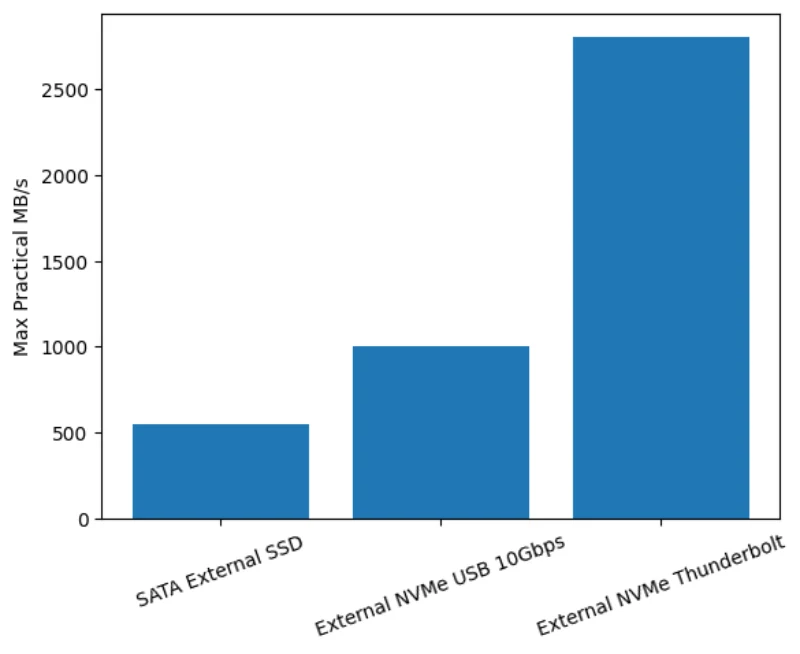
The primary argument for NVMe is raw sequential speed. External NVMe drives use M.2 NVMe modules inside USB-C or Thunderbolt enclosures, and standard external SSDs typically contain SATA III controllers. This architectural divergence creates a 5x theoretical bandwidth gap.
External SATA SSDs are constrained by the SATA protocol ceiling, typically around 500–550 MB/s sequential throughput. External NVMe devices operate over USB 3.2 Gen2, Gen2x2, or Thunderbolt; practical transfer rates from 900 MB/s to over 2800 MB/s based on controller and host port. On paper, NVMe wins. In practice, the external interface renders this advantage null for the majority of users.
External NVMe drives rely on the USB protocol to tunnel PCIe signals, which requires a bridge chip (e.g., ASMedia, Realtek, or JMicron), and it introduces latency. More importantly, the speed is strictly dictated by the USB generation of the host port, not the drive. Unless you know what generation your USB ports are, or if you have regular USB-A cables, you won’t be able to learn about the complete NVMe speed gain.
In the real world, things don’t always pan out as expected. USB controller issues, thermal throttling in compact boxes, and filesystem fragmentation mostly compress NVMe benefits. A Samsung T7 (SATA-based external SSD) delivers 1,050 MB/s sequential reads despite SATA limitations because it implements custom UASP optimization. Meanwhile, budget NVMe enclosures with JMicron JMS583 controllers often throttle to 800 MB/s after just thirty seconds of sustained writes, as their aluminum shells struggle to dissipate 8-12W of heat.
[internal_posts_grid titles=”How to Buy the Right Graphics Card: GPU Buying Guide, How to Build a Gaming PC for Beginners, 10 Things to Consider Before Buying a Used Computer or Laptop”]The Physics of Heat: Throttling vs. Consistency
NAND flash memory operates best when warm, but the controller that manages the data must remain cool. NVMe controllers process data at much higher clock rates than SATA controllers, which generates heat. In a desktop, airflow manages this. In a sealed, IP65-rated rubberized external enclosure, the heat has nowhere to go and leads to thermal throttling. If an NVMe drive hits its thermal junction max (usually around 70°C-80°C), it slashes voltage and clock speeds to prevent physical damage.
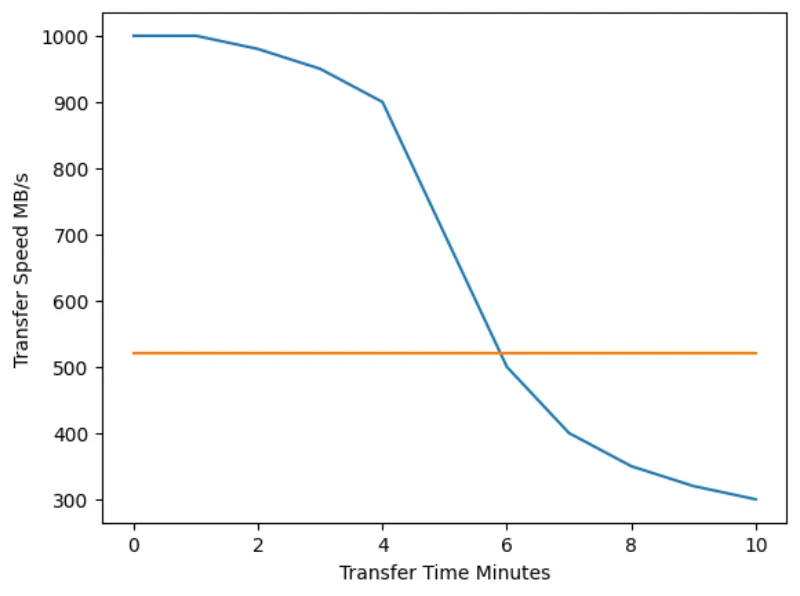
Let’s say you transfer 500GB of 4K footage.
- Seconds 0-60: The NVMe drive will blaze at 1000 MB/s.
- Second 61: The SLC (Single-Level Cell) cache will fill up, and the controller will overheat.
- Second 62+: Performance will plummet and often drop to 300 MB/s or lower—slower than a standard SATA SSD.
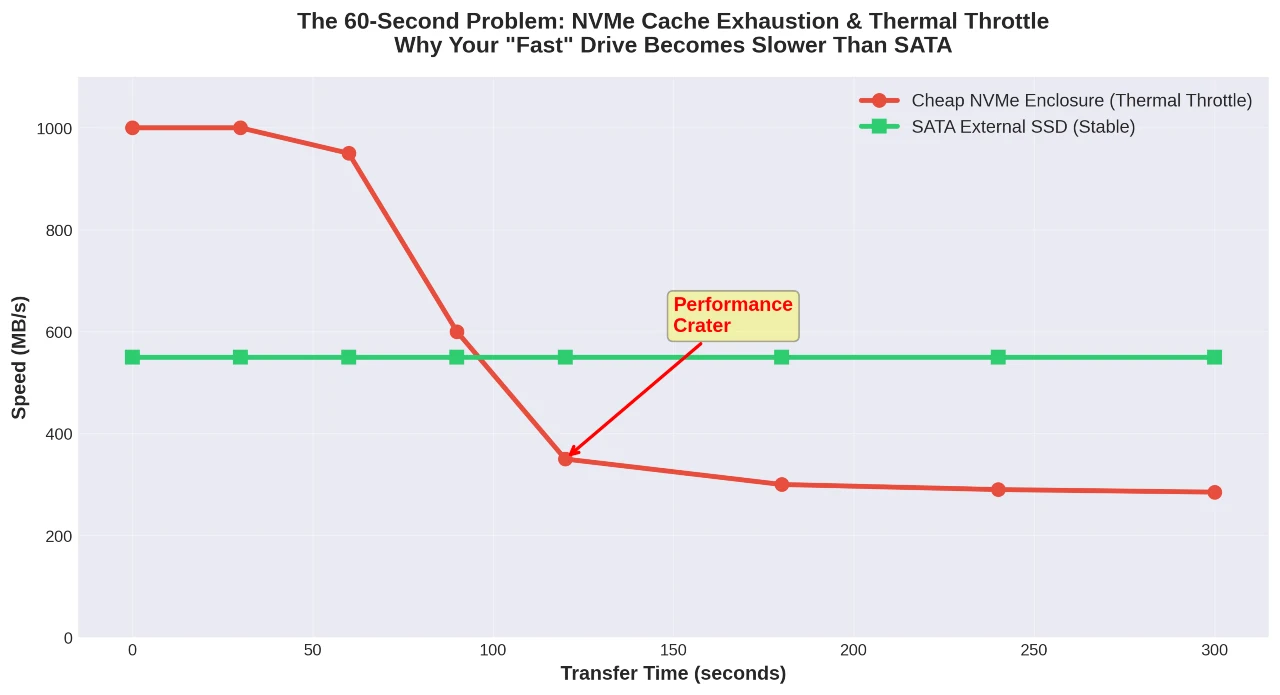
Standard SATA SSDs, particularly in the 2.5-inch form factor, have a larger surface area and less power-hungry controllers that rarely throttle. For continuous, massive file transfers, a high-quality SATA often finishes the race before it overheats, throttling the NVMe drive, despite the NVMe’s advertised higher speeds.
NVMe controllers from Phison, Silicon Motion, and InnoGrit generate massive heat when put under heavy load. External enclosures face thermal problems that internal M.2 slots don’t deal with, since motherboards already have built-in heatsinks. Manufacturers tackle this in three different ways.
- Passive aluminum enclosures move heat to the chassis, but they still hit 65°C when you’re copying large files or running benchmarks for more than a few minutes. At this temperature, throttling occurs, and your blazing-fast NVMe slows down to match what you’d get from an old SATA. You’ll spend $25 to $40 on these, which honestly makes buying this drive pointless.
- Active cooling solutions include a 30mm fan that produces 28 to 35 dBA of noise. Your speeds stay steady, but good luck calling this setup portable anymore. You will have to pay $60 to $90.
- Some premium enclosures skip the fan and use thermal compound with graphene sheets and vapor chambers instead. ASUS, OWC, and Acasis build enclosures this way. Performance remains strong, and you don’t suffer from fan noise, but the cost exceeds $80 before you even insert a drive.
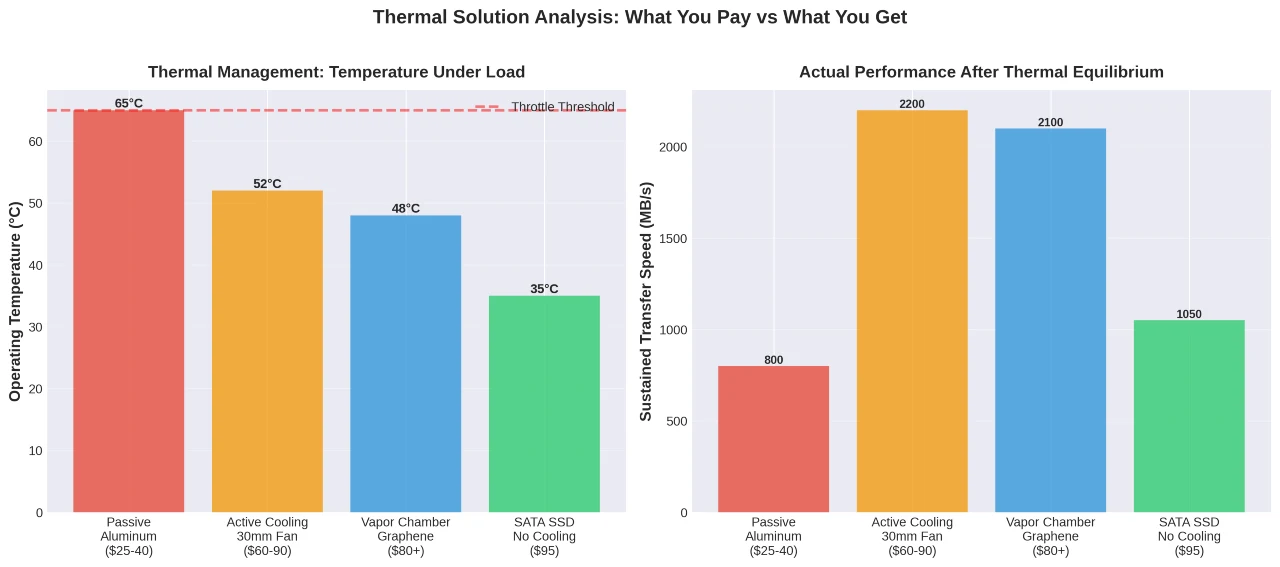
Compare that to standard external SSDs with SATA controllers. They max out at 2 to 4W, need zero thermal management, and run at full speed for life. Samsung’s T5 and T7 lineup proves how reliable this approach can be.
Protocol Overhead and Latency
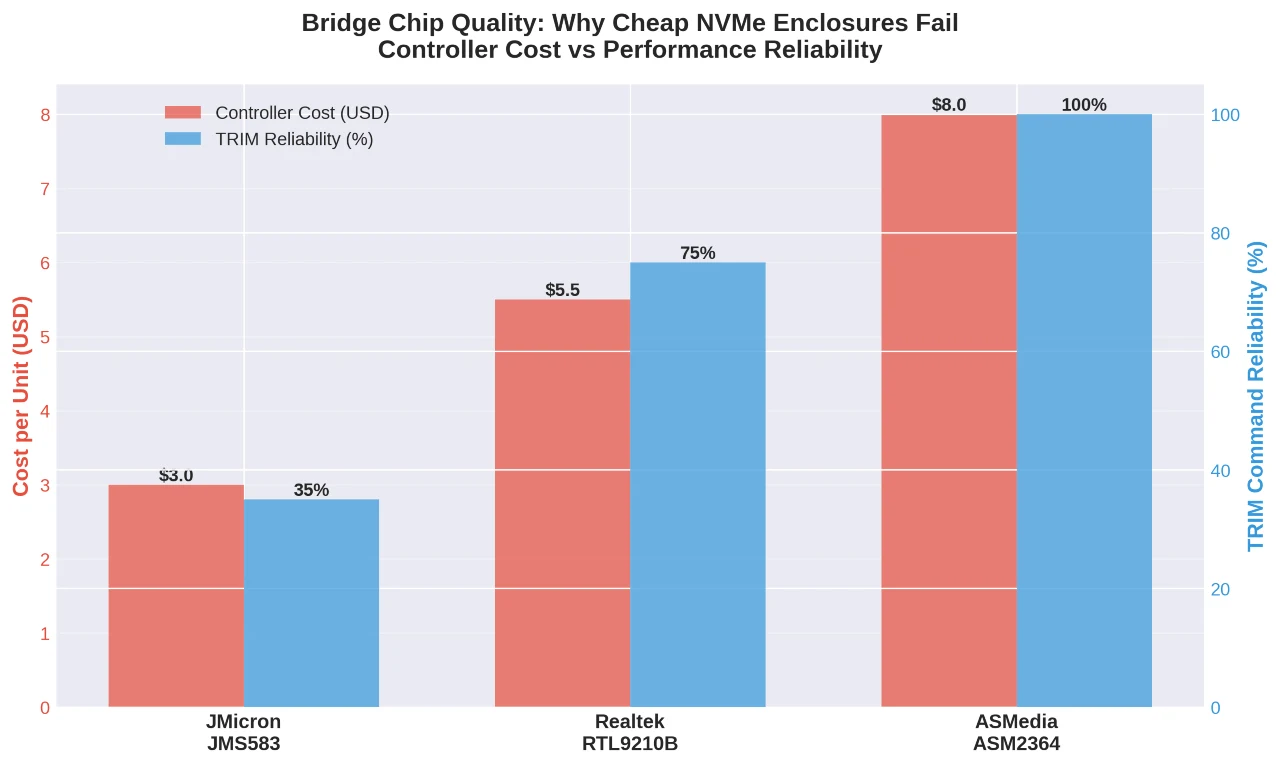
Internal NVMe drives communicate directly with the CPU via PCIe lanes, but external NVMe storage can’t do that. Instead, it has to wrap the PCIe signal into USB packets (encapsulation) and then unwrap them at the host (decapsulation), that extra step creates lag. You won’t notice it for large file transfers (sequential I/O), but it severely impacts performance in random I/O operations, such as when you run an operating system, load heavy software, or compile code from the drive.
The performance suffers because the system continousely request small bits of data scattered across the drive, and each request has to go through that translation process. The bottleneck is all that packaging and unpackaging happening thousands of times per second.
SATA to USB also requires bridging, but the protocol is simple, and the expectations are low. If the goal is high-speed random access (e.g., a portable Windows to Go workspace or a Steam library), the USB interface is the choke point. The NVMe’s low-latency architecture is largely wasted when forced through the USB 3.x stack. Only Thunderbolt 3/4 or USB4 connections, which tunnel PCIe without standard USB translation, preserve the true NVMe responsiveness. Without Thunderbolt, you won’t see actual NVMe latency.
NVMe cuts down on command latency from around 80–120 microseconds (typical for SATA) to about 20–40 microseconds in optimized environments. You’ll notice the difference when launch big software from an external drive or run a portable dev setup. Also, booting an OS externally shows off NVMe’s fast access times.
The Durability Paradox and Longevity Factors
Marketing teams like to claim NVMe drives are more durable because they have a small form factor, lack moving parts, and are built to last, but the reality is messier. Sure, the M.2 stick itself can take a beating. But the external enclosure around it is where things fall apart.
USB-C connectors get soldered to thin PCBs (Printed Circuit Board) that flex and crack under stress. Inside these cases, your M.2 drive plugs into a socket on a tiny daughterboard. Drop the thing once, and that leverage from the drive’s length can unseat it completely or snap the connector joints. I’ve seen it happen more than I’d want to admit.
Conversely, 2.5-inch SATA SSDs are screwed into a large metal chassis. The SATA connector block itself is chunky and reinforced. If you use these drives in the field, throw them in bags, drop them on concrete, the SATA drive in a good aluminum enclosure usually survives impact better than a delicate M.2 stick in a sleek, tool-less housing. You want durability where it counts? Skip the marketing hype and think about real-world abuse. Sometimes the older design just works better.
SATA controllers in external SSDs are mature technologies with fifteen years of firmware refinement. Power loss protection, wear leveling, and error correction operate predictably. Since external NVMe is still young, you might run into compatibility issues with certain motherboard USB controllers, which often need firmware updates to fix. It’s a normal problem, especially with ASMedia and Intel USB 3.2.
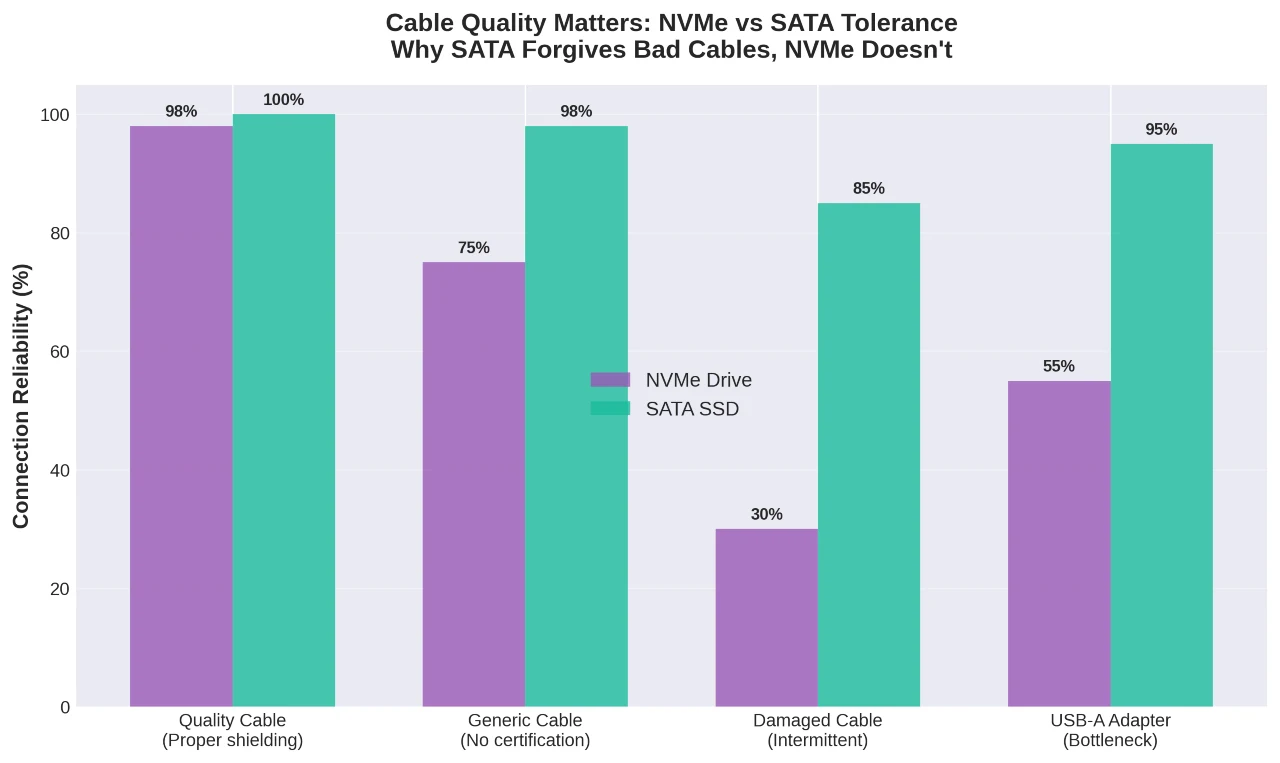
Cable quality is far more important for NVMe drives. USB-C cables that transmit 10 Gbps signals require adequate shielding and 56kΩ resistors installed correctly. Poor-quality cables can cause interruptions that can corrupt filesystems. SATA external SSDs are more forgiving with inferior cables; their 6 Gbps signaling gives them some wiggle room.
Should You Buy External NVMe Drives or Standard SSDs?
Do not choose based on price or advertised speed. Pick the one based on workflow mechanics.
Buy Standard SATA SSDs If:
- Cold Storage / Backups: The lower cost per terabyte allows for redundancy (buying two drives). Speed is irrelevant for background backups.
- Legacy Hardware: You connect to USB-A ports or machines older than 2019.
- Console Gaming (Last Gen): PS4/Xbox One cannot use NVMe speeds via USB.
- Long-form Recording: Cameras that record to SSD often prefer the thermal stability of SATA over the peak bursts of NVMe.
Go with standard external SSDs for documents, photos, backups, moving files around, or anything where 1,000 MB/s is enough speed. They’re very reliable, stay within controlled temperature, and have cable tolerance that justifies their architectural simplicity.
Buy External NVMe (USB 10Gbps) If:
- Video Editing: You scrub timelines directly from the drive, as the random read speed helps here.
- Active Project Transfer: You move 50GB+ files daily between machines confirmed to have USB 3.2 Gen 2 ports.
- Physical Size: You strictly require the smallest possible footprint.
Buy an external NVMe if you frequently transfer files over 50GB, edit video or audio that needs bandwidth above 1,000 MB/s, or run programs off external storage where every millisecond counts. Get a solid premade unit or match a quality enclosure with drives that won’t melt under pressure. The SK Hynix P31 and WD SN740 both handle heat well and won’t throttle when you need them most.
Buy Thunderbolt/USB4 NVMe If:
- OS Booting: For a portable macOS or Windows installation.
- Professional Grading/VFX: High-bitrate RAW footage requiring >1500 MB/s sustained read.
The standard SSD is not obsolete; it is the mature, stable plateau of external storage. NVMe is a high-performance volatile tier that requires specific environmental conditions (ports, cables, airflow) to function. If you can’t guarantee the host environment, an NVMe is basically just a SATA drive with a heating issue. Optimize for consistent throughput and thermal management, not the number printed on the box.