
Close Menu
Technical Master – Windows, Android & iPhone Fixes
    Facebook X (Twitter) Instagram Vimeo YouTube SoundCloud
    Technical Master – Windows, Android & iPhone FixesTechnical Master – Windows, Android & iPhone Fixes
    • Android Fixes
    • Device Fixes
    • How-To Guides
    • iPhone & iOS Fixes
    • Tech Explainers
    • Windows Fixes
    Technical Master – Windows, Android & iPhone Fixes
    Home / Windows Fixes / AMD Ryzen CPUs Hit Speed Bumps in PC Games Due to a Windows 11 Bug, But Think Twice Before Using the ‘Fix
    Windows Fixes

    AMD Ryzen CPUs Hit Speed Bumps in PC Games Due to a Windows 11 Bug, But Think Twice Before Using the ‘Fix

    There is a quick way to increase the performance. But is it worth try?
    By Ali UsamaAug 17, 2024 4:37 AM GMT+5Updated:2 days ago3 Mins Read
    Share Facebook Twitter Pinterest LinkedIn Reddit Telegram WhatsApp Email Threads Copy Link
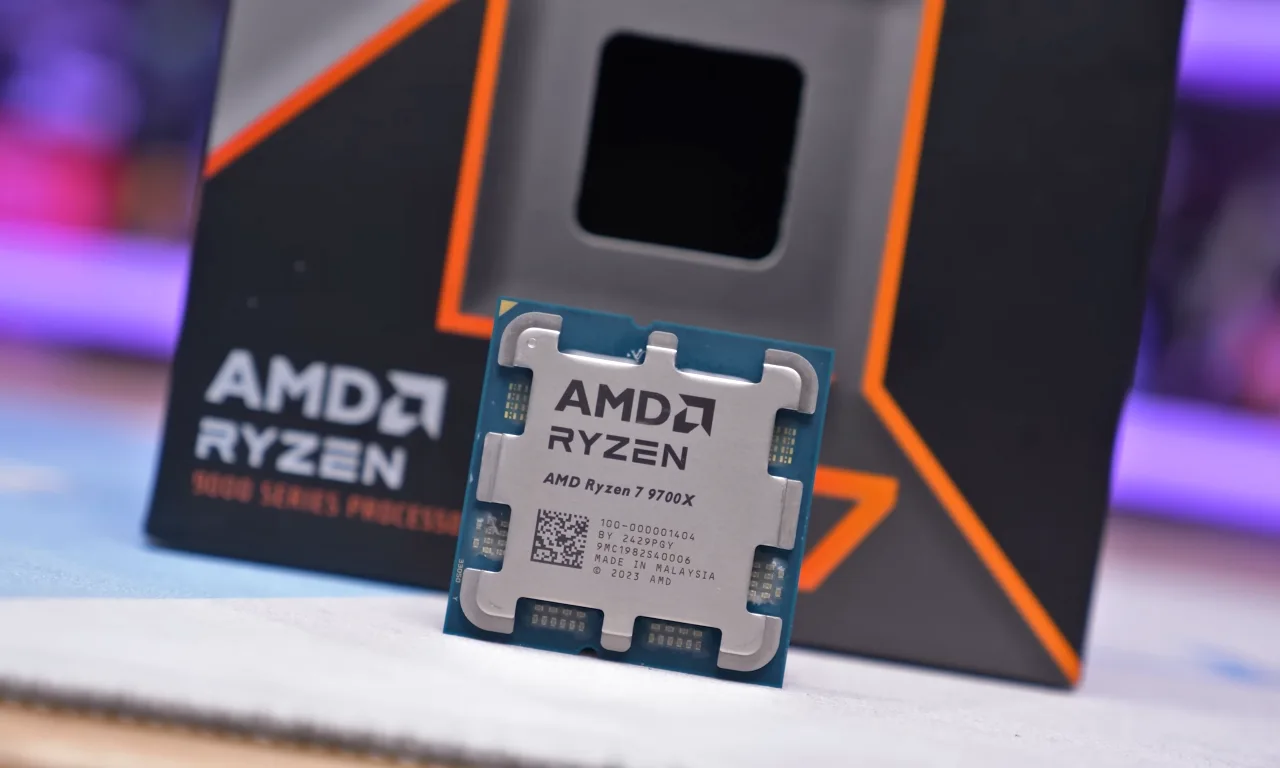
    AMD Ryzen 9700x CPU with box on the back.
    Image: Hardware Unboxed/YouTube

    The joys of PC gaming—where even a little bug or issue can throw a wrench in your gaming sessions, sending all your finely-tuned settings into a tailspin. Recently, AMD’s Ryzen processors have faced slow speed problems in PC games due to some peculiar bug in Windows 11.

    The details came from Hardware Unboxed (via VideoCardz), a YouTube channel that knows a thing or two about PC hardware problems. In their latest review of the Ryzen 9700X, they noticed something odd: the gaming performance was lagging a few percentage points behind what AMD had stated based on their tests. That’s enough to raise an eyebrow (or two).

    After a bit of detective work involving AMD and Hardware Unboxed——AMD threw a curious question: was the review conducted using an admin account? Not the basic account, mind you, but the ‘hidden’ system administrator account, which you have to enable manually in Windows 11 because it’s disabled in default settings.

    Why is this relevant? The higher rights of this Windows admin account appear to be resulting in Ryzen chipsets surprisingly performing far quicker in the demanding titles. Thinking in this regard, that should be the reason why Hardware Unboxed and probably many others who didn’t enable this administrative account before testing seem to have struggled with speed. The result is a performance disparity that’s not only confusing but also frustrating for gamers.

    The actual timing of this processing bug seems to occur during busy workloads—sudden spikes in processing demands, which are bread and butter for PC games. Hardware Unboxed did some reruns after activating the hidden admin account and, seriously, Cyberpunk 2077 had a good 7% faster at 1080p on an RTX 4090. So, the processor also matters a lot in gaming controlling the things alongside the graphics card.

    Interestingly, this secret admin account doesn’t just show benefits for the Ryzen 9000 series but also perks up the Ryzen 7000 processors. Their benchmarks showed the Ryzen 9700X generally outperformed its predecessor, the 7700X, with the enabled administrative privileges by some margin, which was concluded after running 13 different PC games.

    But what’s really going on here? Is it a bug, or is it something about the elevated privileges of the hidden admin account reducing overhead in gaming demands? The truth is, it’s a bit murky. Although AMD suggests it’s a Windows 11 issue, there’s no solid proof yet. We also don’t know how Team Green chipsets will perform in this scenario because Intel CPUs remain untested as of now. So, there are a lot of twists and turns about the exact problem.

    What we do know is that if this is an issue from the Ryzen end, once Team Red fixes this bug, AMD CPUs are most likely to outperform their rival Intel chips very well. There is also a question mark regarding the situation on Windows 10 because we haven’t seen any results of processor testing on this operating system.

    With all that said, you might also want to switch on this hidden admin account for an extra boost in your favorite games, let me throw in a word of caution: don’t. The account, which is not enabled by default by Microsoft should have its concerns and logic. It’s actually not a local admin you can use in your normal routine, but it is typically reserved for troubleshooting and other niche scenarios. Using it as a daily driver exposes your system to heavy security risks, like malware or virus infections. So, even if you manage to get a few extra frames, it’s not worth it.

    Support Technical Master and add us as your preferred source on Google.

    Add Source
    Follow Us on Google News Follow Us on Flipboard
    Ali Usama
    • Website
    • LinkedIn

    Ali Usama has spent more than 7 years fixing iPhones. As the Apple specialist at Technical Master, he’s the person you go to when your phone won't charge, the Wi-Fi keeps dropping, or the battery dies by noon. Ali has worked through just about every iOS update to date, which means he has seen the same bugs pop up year after year. When that happens, he find the root cause of a performance lag or sync error. It’s a practical approach—fix the problem, then explain what went wrong so it doesn't happen again. When he's not helping someone rescue their iPhone ot iPad, he usually test whatever new features Apple release or find better ways to keep devices run at best.

    Related Posts
    How to Change the DNS Server on Your Windows PC and Mac
    How to Change Your DNS Server on Windows and Mac
    Windows Fixes
    How to Fix Corrupt Video Files on Windows & Mac OS
    How to Fix Corrupt Video Files on Windows and Mac
    Windows Fixes
    Find the Steam Screenshot Folder Location
    Steam Screenshot Folder: Where to Find the Saved Screenshots
    Windows Fixes
    A desk setup with a widescreen gaming monitor with crisp visuals, showing a fantasy RPG landscape in sharp vivid colors.
    Importance of Finding the Right Gaming Monitor
    Windows Fixes
    How to Fix Nvidia GeForce Experience Error Code 0x0003
    How to Fix Nvidia GeForce Experience Error Code 0x0003
    Windows Fixes
    How to Convert HEIC to JPG on Windows
    How to Convert HEIC to JPG on Windows
    Windows Fixes

    When you buy anything through links on our site, we may earn an affiliate commission. Learn more

    Trending Now

    Don’t Use Pattern Lock to Secure Your Android Phone: Here’s Why

    How to Fix Android Phone Not Charging Issue

    How to Change Your DNS Server on Windows and Mac

    What Does SOS Only Mean on iPhone and How to Fix It

    How to Fix Corrupt Video Files on Windows and Mac

    How to Fix Laptop Screen Flickering Issue

    Technical Master – Windows, Android & iPhone Fixes
    Facebook X (Twitter) Instagram YouTube Vimeo SoundCloud
    • About Us
    • Privacy Policy
    • Terms of Use
    • Editorial Ethics & Guidelines
    • Contact Us
    • Write for Us
    © 2026 Technical Master, Inc. All Rights Reserved.

    Type above and press Enter to search. Press Esc to cancel.